
If you have been following my site for a while, you know I spend most of my days digging through broken WordPress installs, sorting out server logs, or messing around with Linux builds. But when I am not wearing my sysadmin hat, I love stepping back to enjoy some video games or test out heavy workloads.
Recently, I got my hands on the Lenovo Legion 7i (16IAX10). The gaming laptop market is crowded these days, but Lenovo made it clear this machine is meant to be more than just a toy for playing games. It is aimed squarely at heavy-duty tasks like video editing, 3D rendering, and local AI model development.
Here is my take on how this rig holds up for work, play, and heavy daily use.
Minimalist Build, Heavyweight Feel
When you first look at the Lenovo Legion 7i, it does not scream “gamer” in a loud or obnoxious way. It comes in a clean white finish with a simple, understated aesthetic. Personally, I appreciate this understated look because you can bring it to a meeting or work in a coffee shop without drawing unnecessary attention.
The chassis is built with aluminum, giving it a solid and sturdy feel. That durability comes with a trade-off: it weighs around 2 kg and measures 15.9 mm to 17.9 mm in thickness. It is definitely a chunkier machine, but that extra chassis volume is necessary to keep high-end components cool under load.
Port selection and layout are well thought out:
- Left Side: Includes a Thunderbolt 4 port, USB-C (10Gbps with Power Delivery and DisplayPort 2.1), a standard USB-A port, and an audio combo jack.
- Right Side: Features an extra USB-A port, a physical webcam privacy shutter switch, and an SD 4.0 card reader.
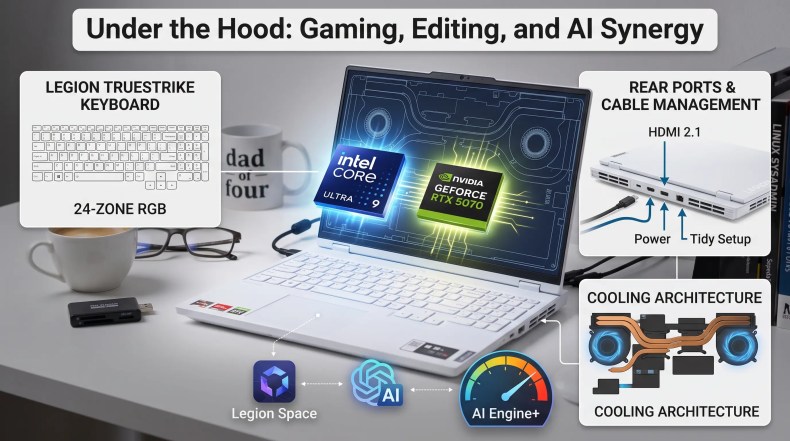
- Rear Side: Holds the power DC-in jack and the HDMI 2.1 port. Placing power and display connectors at the back keeps cables out of your way and makes desktop cable management much cleaner.
Typing on this laptop is surprisingly comfortable. It uses Lenovo’s Legion TrueStrike keyboard with 24-zone RGB lighting, offering solid key travel and high responsiveness whether you are gaming or typing up a long post like this one.

That OLED Screen is the Real Highlight
Most gaming laptops pack IPS panels to maximize raw speed, but Lenovo chose a 16-inch WQXGA (2560 x 1600) PureSight OLED panel for this model.
- For Gaming: The 165Hz refresh rate keeps competitive titles fluid and sharp, giving you smooth motion clarity.
- For Content Creation: With 100% DCI-P3 color coverage and Dolby Vision support, color accuracy is fantastic for video editing and color grading.
- Brightness & Contrast: It features a peak brightness of 500 nits and VESA True Black 1000 certification. In dark environments or horror games, blacks look deep and fully rich instead of washed-out grey.
- Eye Comfort: It includes TÜV Rheinland and X-Rite certifications to help reduce eye strain during long sessions.
Under the Hood: AI Features and Pure Performance
The Legion 7i is powered by an Intel Core Ultra 9 275HX processor alongside an NVIDIA GeForce RTX 5070 Laptop GPU (8GB GDDR7). To back up those core chips, it comes loaded with 32GB of fast LPDDR5X RAM and a 1TB PCIe Gen4 SSD.
For local AI and software management, Lenovo integrated several dedicated tools:
- Legion Space: An intuitive dashboard for monitoring real-time CPU/GPU usage, switching performance modes (Quiet, Balance, Performance, or Custom), and adjusting RGB lighting.
- Lenovo AI Engine+: Uses hardware chips (LA1+LA3) behind the scenes to dynamically adjust power delivery and fan profiles based on system load.
- Lenovo AI Now & Copilot: Offline AI functionality that works with local data, plus a dedicated Copilot key for quick cloud AI assistance.
- Webcam & Security: A 5MP camera with Windows Hello facial recognition and a physical kill switch.
Benchmark & Real-World Numbers
During testing, performance was solid across different benchmarks:
- Cyberpunk 2077: Averaged 78.29 FPS on Ultra/High settings.
- 3DMark Time Spy Extreme: Scored 5,969 points, handling heavy AAA titles smoothly.
- Cinebench 2026: Reached 7,086 points in CPU Multi-Thread, 42,579 points in GPU rendering, and 482 points in Single-Thread performance.
- PCMark 10: Scored 7,961 points, proving it handles regular daily multi-tasking effortlessly.
Battery and Everyday Utility
A laptop with this much power usually drains battery life fast, but the 84Wh battery provides decent flexibility when working away from a wall outlet. For standard tasks like writing, light web browsing, or video meetings, it handles mobile work nicely.
When you do run low, the included Rapid Charge Pro feature tops the battery up quickly:
- 0% to 50%: Takes roughly 30 minutes.
- 0% to 100%: Takes about 120 minutes.

Hardware Specifications Overview
| Category | Specification Details |
| Model | Lenovo Legion 7i 16IAX10 |
| Processor | Intel® Core™ Ultra 9 275HX |
| Graphics | NVIDIA® GeForce RTX™ 5070 (8GB GDDR7, 115W TGP) |
| RAM & Storage | 32GB LPDDR5X / 1TB M.2 PCIe Gen4 SSD |
| Display | 16″ WQXGA (2560×1600) OLED, 165Hz, 100% DCI-P3, 500 nits |
| Battery | 84Whr with Rapid Charge Pro support |
| Connectivity | Wi-Fi 7, Bluetooth 5.4, Thunderbolt 4, HDMI 2.1 |
| Weight & Size | 2.0 kg / 15.9mm–17.9mm thickness |

Final Thoughts
The Lenovo Legion 7i 16IAX10 strikes a great balance between high-end hardware performance and practical usability. Whether you need a machine for gaming, local AI testing, or video editing, it delivers plenty of power without looking like an over-the-top gaming rig.
What I Like:
- Stunning, bright 16-inch OLED display with deep black levels.
- Sturdy build quality and comfortable keyboard.
- Top-tier CPU performance for heavy rendering and tasks.
- Clean rear-port layout for easy desktop setups.
Things to Keep in Mind:
- The GPU is limited to 8GB of VRAM.
- There is no built-in RJ45 Ethernet port, so you will need a dongle for wired network connections.
- It is on the heavier side at 2 kg.
Overall, if you are looking for a powerful all-rounder that can move smoothly between serious work and high-end gaming, this machine is definitely worth taking a closer look at.
Have you tried using an OLED laptop for daily work or gaming yet? Let me know your thoughts in the comments below!
No Comments